PDF reading and research

Read deeply.Make it your own.

Read papers alongside their translations, check AI answers against their sources, and save passages with your own notes.

Start in your browser. Sign in to save papers, annotations and notes.

A laptop showing a paper and an AI answer side by side, with handwritten notes on the desk
Read the paper beside the AI answer
Organize

Read, translate, ask and take notes

Switch between the demos to see how annotations, translations, AI references and notes work alongside the paper.

Explore all features
A closer look at learning.pdfYushi PDF Reader
Keep the source in view

Reading & understanding

A closer look
at learning.

Abstract

Reading is an active process of connecting evidence, questions and ideas.

A useful note keeps the evidence close to the idea. It helps us return to the source and build a clearer understanding.

Making connections

Good questions turn a passage into a starting point. Keep the original in view as you explore a new perspective.

From reading to understanding

Compare the text, consider its context, and record what matters to you.

Understanding grows when new ideas meet what we already know.

question → evidence → insight
重点标清楚,想法留得住。

让标记、备注和原文待在一起,每一次回顾都接得上。

Illustrative interface with an example document.

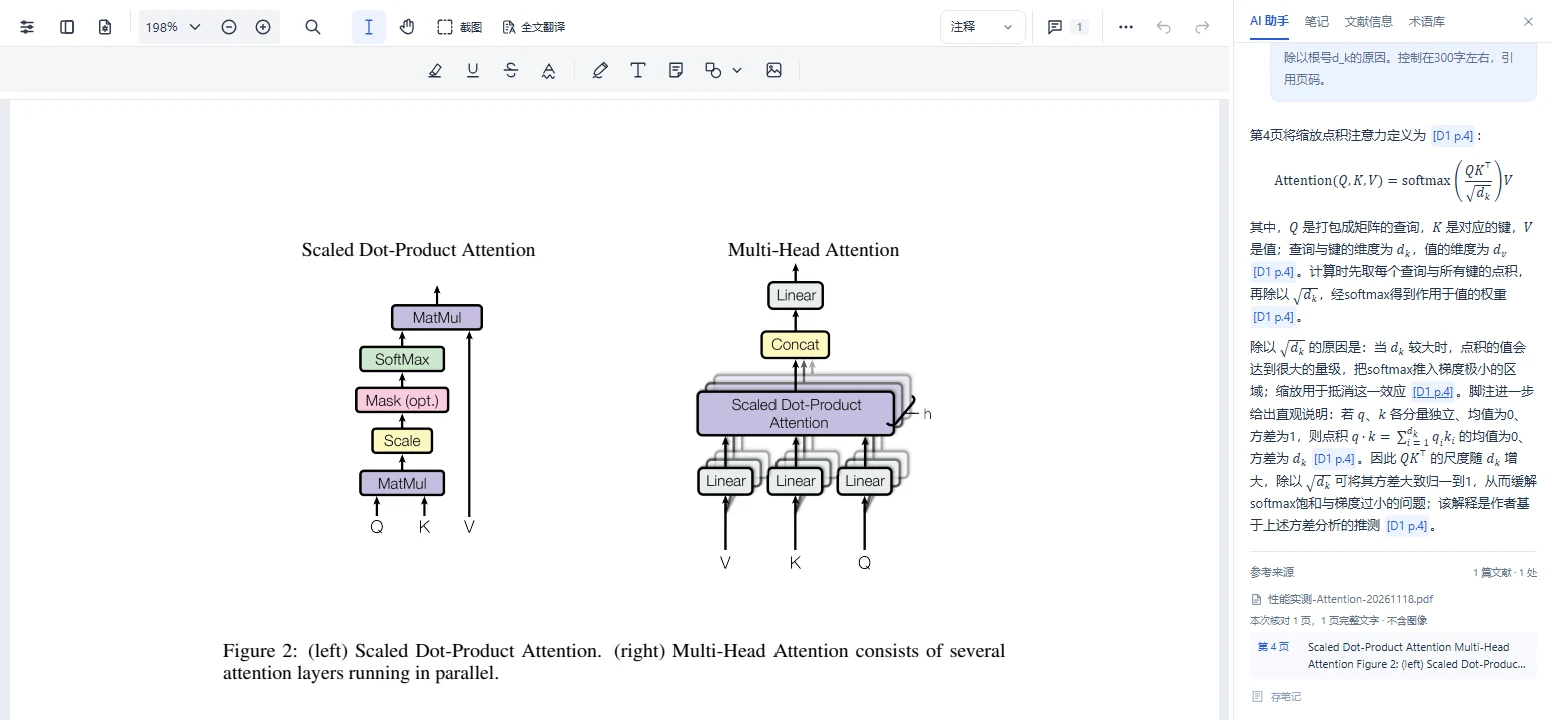
Follow the answer back to the paper

Ask AI about an equation, then use the page references in its answer to check the paper.

Try it in the reader
Yushi PDF Reader showing the attention paper beside an explanation of its equation with a reference to page 4

Guides for common reading tasks

All features

Explore annotations, translation, your library and other reading tools.

Try it in the reader
Comfortable reading & flexible annotationsOpen several papers. Focus on a page. Keep what matters.
  • Document tabs, in-document search, zoom and page navigation, with your reading position remembered.
  • Reading, annotation and focus modes, Chinese and English interfaces, and light and dark themes.
  • Highlights, underlines, strikeouts, squiggly lines, freehand marks, shapes, Bézier curves, text and sticky notes.
  • Changes save action by action with visible sync status. Translate, explain, download or add a screenshot to notes.
Translation, from a word to a whole paperTranslated PDFs, bilingual PDFs and independent comparison.
  • Translate selected words, passages or screenshots, using your terminology for specialist language.
  • Translate full text into multiple languages. Review estimates first, then track, cancel and revisit tasks.
  • Get translated and bilingual PDFs retaining figures, equations and page structure. Download or add results to your library.
  • Compare original and translation with linked pages, independent zoom and side-by-side or stacked layouts. Review complex layouts against the original.
AI research with sources you can checkAsk about the text and figures, then explore beyond the paper.
  • Ask about one or several papers, keep conversation history and context, and choose deep thinking when needed.
  • Use selections, screenshots, multiple images or explicitly selected PDF pages to discuss figures and scanned material.
  • Enable web search or public-link reading explicitly. Follow the process and stop it when needed.
  • Check separate PDF page and web references. Add useful answers to your notes.
Notes, mind maps & a growing body of knowledgeWrite as you read, or organize ideas independently.
  • A visual editor for nested lists, tasks, tables and images.
  • Autosave, local drafts and manual saving. Clear offline and conflict messages keep your input safe.
  • Text notes retain linked sources for two-way navigation. Adding a screenshot inserts the image without inventing a text citation.
  • Use notes in the reader or a dedicated workspace, with preview, mind maps and exports including Markdown and Word.
An organized library of papers & supporting materialKeep titles, sources and attachments alongside your PDFs.
  • Folders, tags, favorites, recent reading, list and grid views, page controls, filters and global search.
  • Original titles, translated titles, custom names, authors, publication, DOI, abstract, year and your remarks.
  • Look up DOI, arXiv or title clues through Crossref and DataCite. Review candidates before filling details, or choose a web search.
  • Keep file attachments and public links. Copy references as plain text, BibTeX or RIS.
Your own specialist glossaryKeep the language of your field consistent.
  • Record source terms, preferred translations, domains and definitions. Add terms from selected text or annotations.
  • Import and export CSV files to maintain your terminology.
  • Use your glossary in translations. Existing full-document tasks retain their original terminology settings.
Cloud & local reading, each in its placeContinue with the same account, or read local files offline.
  • Use the same cloud account, documents, notes and benefits on web and desktop.
  • Open local PDFs offline in the Windows app, annotate and save a copy without overwriting originals. Upload only when you choose.
  • Read fully cached cloud papers offline after signing in. Reconnect with the same account to sync pending changes.
  • AI, translation, web research and cloud management require a connection.
Clear saving, account benefits & feedbackYour material has access boundaries. Your usage has a record.
  • Documents, attachments, annotations and notes are protected by account access checks.
  • Separate Trash views for documents, full translations and terms, with recovery under the applicable retention rules.
  • Review membership benefits, Token usage, orders and storage in your account. Charges follow the rules displayed in the reader.
  • Send text and screenshot feedback, then follow its status.

Pick up your reading on another device

Sign in to the same account on the web and in the Windows app. Open a paper from your cloud library to see its saved annotations and notes.

Switch between light and darkChoose a light background during the day or a darker one at night. Try both on the same page.
Read offline on WindowsRead and annotate cached cloud papers offline. Reconnect with the same account to sync pending changes.
Reader preview
Reader preview
A sample PDF open in the Yushi reader with light appearance The same PDF page open in the Yushi reader with dark appearance
Screenshots of the same PDF page

Membership & plans

Every plan includes 80 pages of PDF translation each month, plus storage, web tools and Tokens.

View membership in the reader
30 GB cloud storage
Keep papers, note images and attachments together.
300 web tools / month
One shared allowance for literature searches, AI web search and reading links.
20% off Token top-ups
Add more Tokens for AI answers, visual analysis and translation.
30-day trash recovery
Recover deleted papers, translation results and glossary terms.

Annual

12 months · one payment

¥249

Approx. ¥0.68 / day

1,000,000Tokens / month

6 months

6 months · one payment

¥149

Approx. ¥0.83 / day

900,000Tokens / month

Quarterly

3 months · one payment

¥89

Approx. ¥0.99 / day

800,000Tokens / month

Monthly

1 month · one payment

¥49

Approx. ¥1.63 / day

700,000Tokens / month

Tokens and translation pages renew monthly from activation and expire at the next grant. Extra pages use Tokens. Renewals start after the current term. Web tools share 300 uses each month. Extra uses cost 1000 Tokens each.

AI answers and visual analysis use Tokens based on actual usage. Basic DOI/title registry lookup is free. Daily estimates use 365 / 180 / 90 / 30 days for annual / six-month / quarterly / monthly plans. Membership follows calendar months. The reader shows current prices and benefits before purchase.

Start with a free account.

500 MB cloud storage and 50,000 trial Tokens at registration. Each account gets 30 pages of PDF translation, valid until used.

Free-account trash is retained for 7 days; membership is required to restore it.
Start reading for free

Frequently asked questions

Can I start using it now?

Yes. Explore the reader in your browser, then sign in to upload and save personal content. Download the Windows app for local reading.

How are AI, translation and web tools charged?

AI uses platform Tokens. PDF translation uses included pages first, then Tokens for extra pages. You can review the page count and estimate before you start. Web search and link reading show their charges separately and use monthly member allowances first.

What about scanned PDFs, images and equations?

Explicitly choose pages, screenshots or uploaded images for visual reading. Full-document translation currently requires extractable text and aims to retain figures, equations and layout. Check complex layouts and specialist content against the original.

What happens to annotations and notes offline?

Notes retain local drafts and show their save status. The Windows app reads and annotates local PDFs and fully cached cloud papers offline, then syncs after reconnecting with the correct account. Finish syncing before switching devices and keep any unsynced local data.

Will research metadata be overwritten automatically?

Lookups provide candidates with sources for you to review. They do not directly overwrite your manual entries. A valid DOI can still belong to another paper, so check its title, authors and publication.

Can notes link back to the PDF and be exported?

Text selections added to notes retain sources for two-way navigation between note and paper. Screenshots insert images only. Use visual editing, preview, mind maps and exports including Markdown and Word.

Your next paper starts here.

Open a PDF and highlight a passage worth revisiting.

Your feedback shapes what comes next.

Share your questions and ideas about reading PDFs.

予时PDF阅读器微信客服二维码

Our shared Yingzuo support channel can help. Mention “Yushi PDF Reader”.

Save QR code